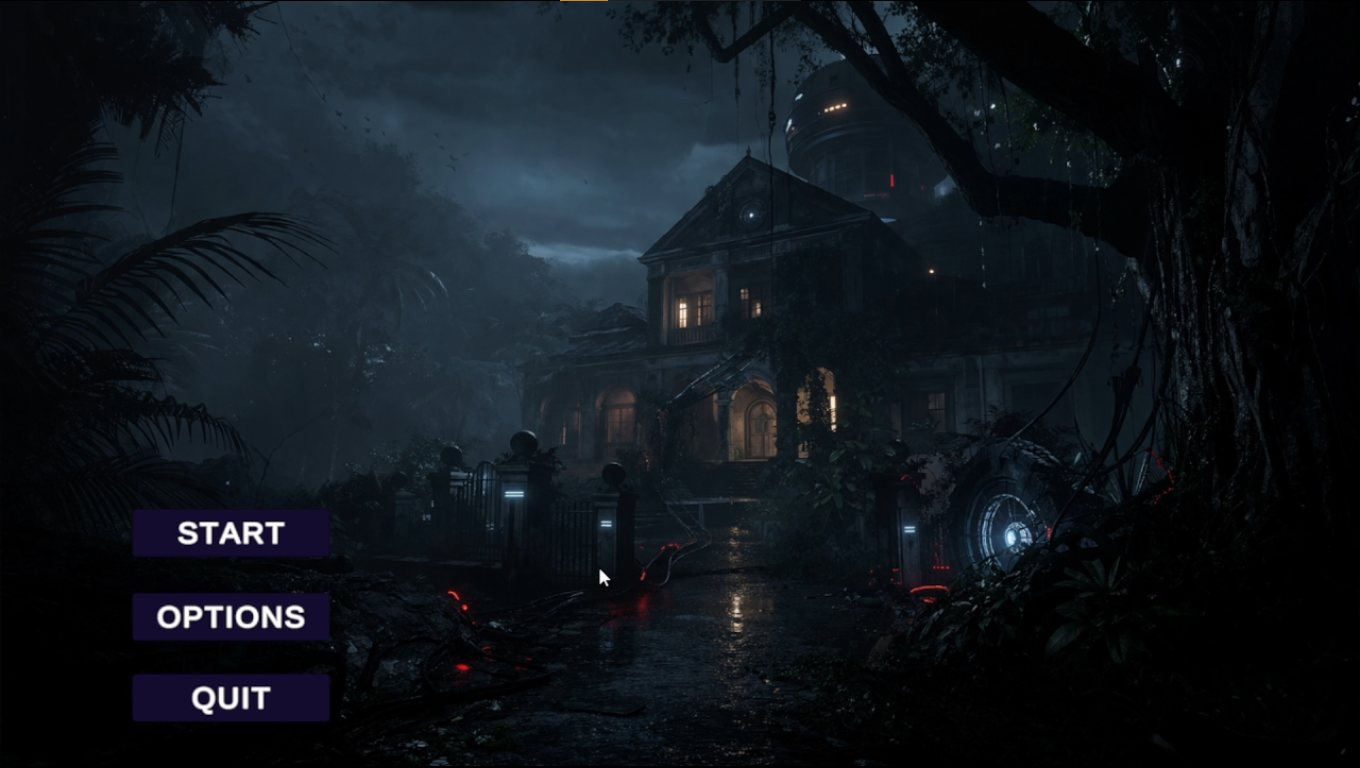
Old Raman House
An abandoned house, a flickering torch, and a CCTV mystery — a 2D horror side-scroller built during a remote game development internship.
Gameplay prototype — player movement, lighting, and door interaction.
The Spark
AZYMAR's remote internship brief was a 2D horror side-scroller for mobile, in the vein of Granny: dark rooms, tense exploration, and doors that matter. It was a chance to move beyond writing code in isolation and work inside a production-style workflow, where gameplay code had to fit around shared scenes, art, and lighting.
Project Brief
Old Raman House is a 2D horror investigation game set inside an abandoned house. The player explores connected rooms and dim hallways, where darkness, lighting, and environmental detail build tension.
The broader concept adds a sci-fi mystery built around CCTV footage and disturbances in the timeline, raising the question of whether what the player sees can be trusted. The prototype I worked on focuses on the foundations that mystery depends on: movement, atmosphere, doors, and scene transitions.
Key elements
The core loop
Start from the main menu → Move through the dark house → Approach a door → Interact to open it and enter → Arrive in the next scene and keep investigating.
Intended audience
Mobile players who enjoy atmospheric horror and exploration games like Granny.
Platform
Designed with mobile in mind. The prototype shown on this page runs in Unity with keyboard controls.
My Role & Responsibilities
Role: Game Development Intern — Gameplay Programming · Animation · Environment Design
The project was developed collaboratively, with tasks assigned and discussed in online team meetings. I took ownership of the following areas.
- Door interaction system: Designed and implemented the door open/close mechanic, including the interaction logic, the door animation, and the scene transition it triggers.
- Player controller and movement: Wrote the player controller scripts and movement mechanics, including walking, running, and character flipping.
- Character animation: Created the walk and run sprite animations and connected them to the movement code.
- Lighting and atmosphere: Adjusted scene lighting for dark interiors and implemented the torch flickering effect.
- Environment design: Built the Main Hallway and CCTV Room scenes, arranging elements to support both the atmosphere and the door mechanic.
- UI: Contributed to the Main Menu and Options Menu.
Development Process
Architecture overview
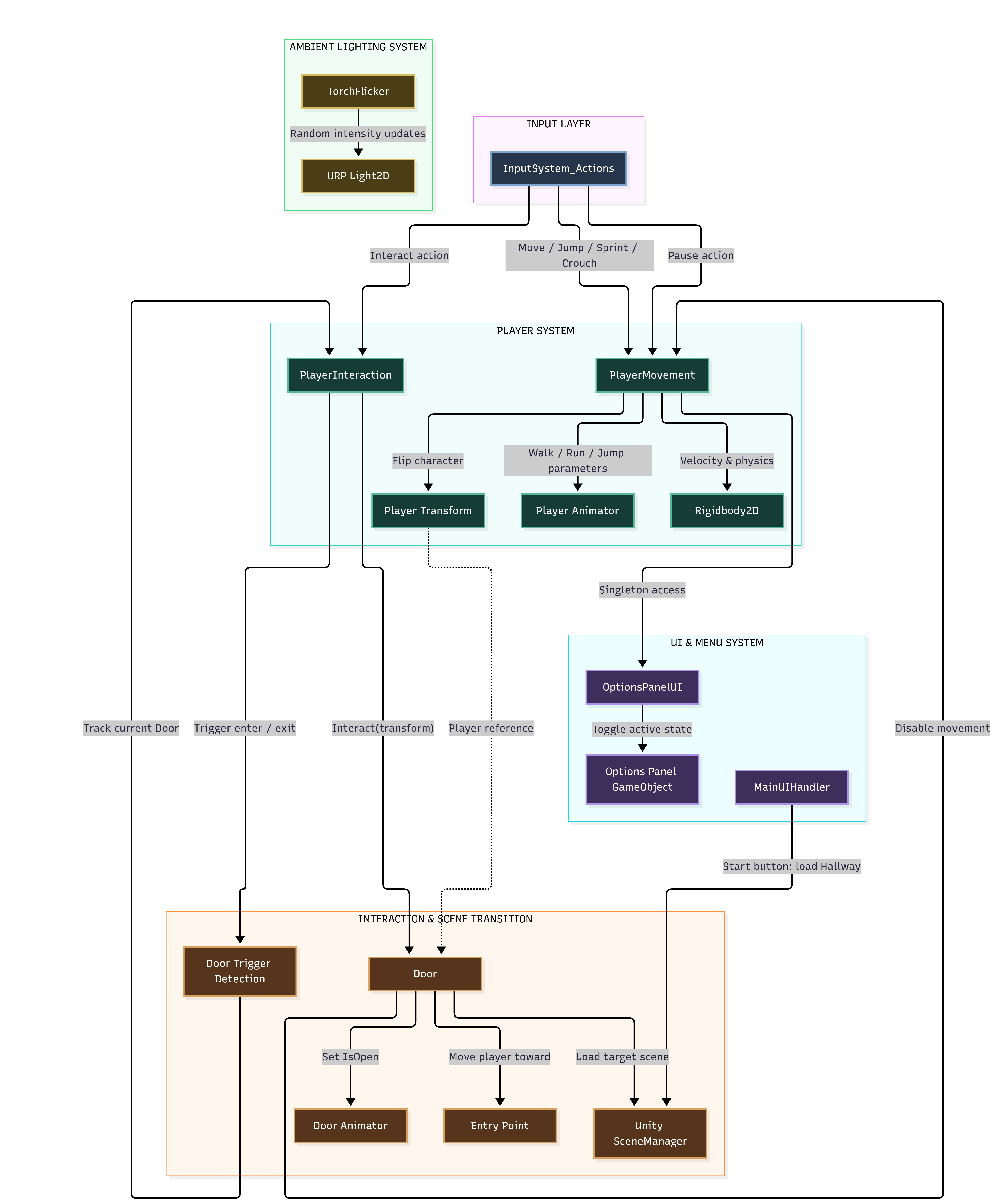
I split the prototype into five small groups of scripts, so input, player behaviour, interaction, UI, and lighting could each be changed without touching the others.
Door interaction — more than a trigger
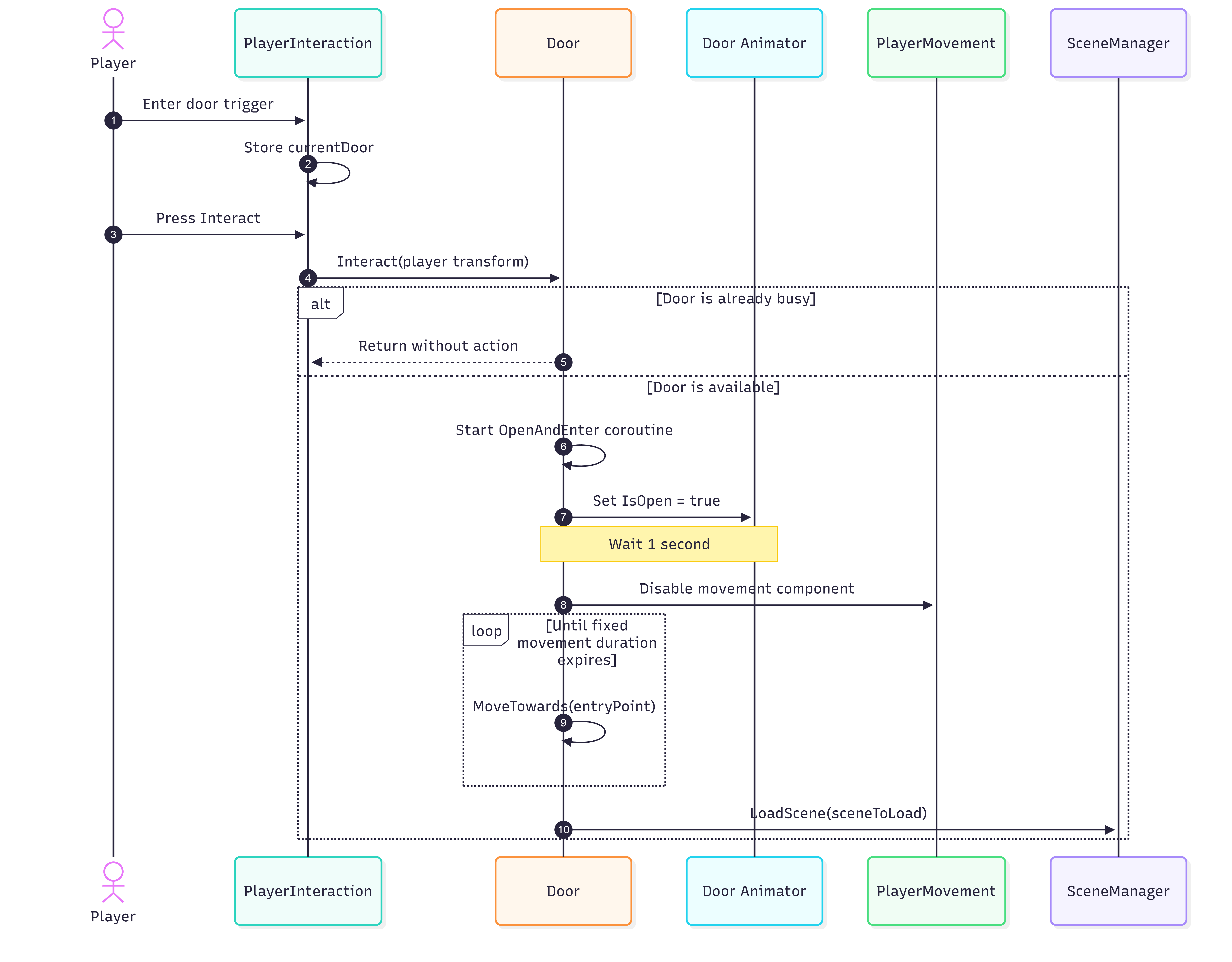
Doors needed to feel like physical objects in the house rather than invisible scene switches. A door interaction therefore involves four systems working in order: the player's interaction script, the door, its animator, and the scene loader.
-
Detection: A trigger on the door tells PlayerInteraction which door is currently in range, and clears it when the player walks away.
-
Interaction: Pressing the interact key calls the door with the player's transform.
-
Busy guard: If the door is already mid-sequence, the call returns without doing anything, so repeated presses cannot restart the transition.
-
Open: A coroutine sets the animator's
IsOpenstate and waits one second for the animation to play. -
Hand-off: The player's movement component is disabled so input cannot fight the scripted movement.
-
Walk-in: The player is moved toward the door's entry point for a fixed duration, which makes them visibly step into the doorway.
-
Transition: The target scene is loaded through Unity's SceneManager.
Putting the sequence in a coroutine kept the whole flow in one readable method, instead of spreading timing logic across several scripts.
Lighting & torch flicker
In a horror game, visibility is part of the gameplay. I lowered the scene's global 2D light so the environment stays dark, then added a TorchFlicker script that applies random intensity updates to a URP 2D light.
The flicker is deliberately irregular rather than a fixed loop, so the light feels unstable instead of animated. It is kept in its own script, separate from the player and door code, so any light in any scene can use it.
Player movement & animation
PlayerMovement reads actions from the Input System and applies the result in three places: velocity on the Rigidbody2D, walk and run parameters on the Animator, and a flip of the character's transform to face the direction of travel.
I created the walking and running sprite cycles and wired them to those animator parameters, so the animation state always follows the movement state. Door transitions disable this component for the duration of the sequence, which is why the two systems are connected in the architecture diagram.
Environment design — Main Hallway & CCTV Room
I built two scenes. The Main Hallway is the primary horror space: a narrow, dim corridor where the door mechanic and torch lighting are first presented. The CCTV Room is a separate interior that shows the same door system working in a different setting, and ties into the surveillance mystery of the wider concept.
Both scenes follow the same structure: a global light, a player, an environment group, and a camera, so a new room can be set up by repeating the pattern.
UI — Menus and controls
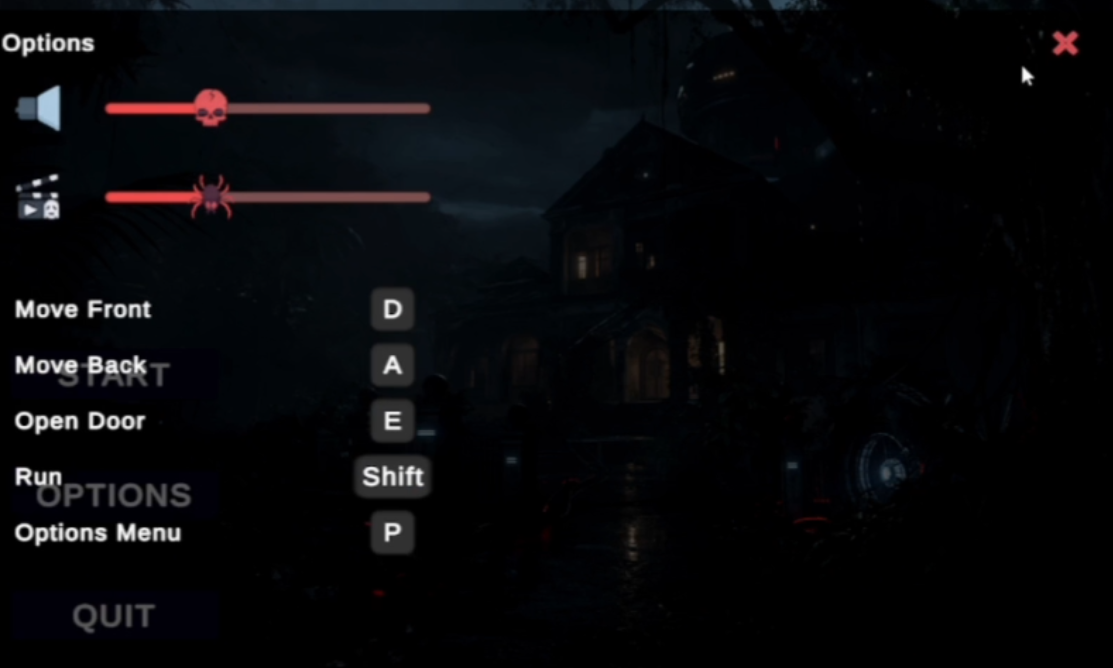
I contributed to the Main Menu and the Options Menu. The Start button on the main menu loads the Hallway scene, and the options panel is toggled through a singleton OptionsPanelUI, so it can be opened with the pause key during play.
The panel combines two audio sliders with a plain list of key bindings (move, open door, run, options), so a new player can find the controls without leaving the game.
Results
The prototype delivers a playable slice of the game: a main menu leading into the Hallway, player movement with walk and run animation, a dark environment with a flickering torch, and doors that animate, move the player through, and load the next scene.
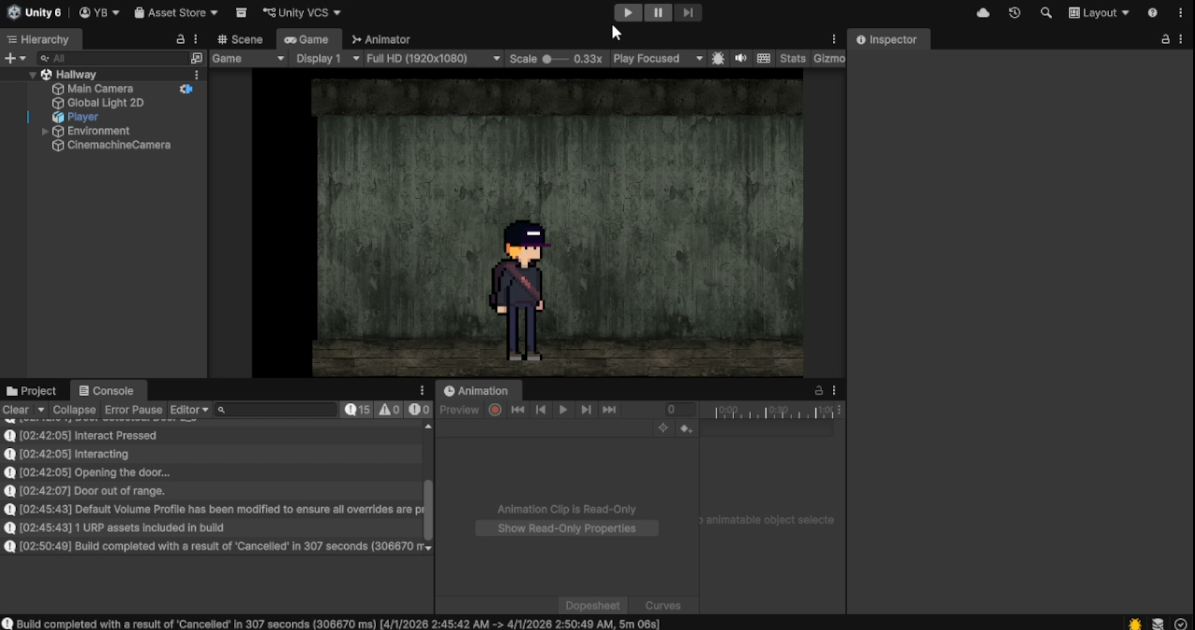
The Unity Editor view shows the Hallway scene with its player, global light, environment, and camera. The console log shows the door sequence running: the interact press is registered, the door opens, and the player is reported out of range once they leave the trigger.
Functional outcomes
- Door open/close and scene transition working across two environments.
- Player controller with walk and run animation cycles.
- Torch flicker lighting effect in a low-light scene.
- Main Menu and Options Menu with audio controls and key bindings.
This was an internship prototype, and I do not have release or player metrics to report. The evidence here is the running build, the diagrams of how it works, and the scope of what I implemented.
Retrospective
Old Raman House showed me that a horror game is a coordination problem between systems. The door mechanic only felt right once the animation, player lock, camera, and lighting all agreed on what was happening.
The door sequence relies on fixed timings: a one-second wait for the animation and a fixed movement duration. They work, but they break if the animation changes length. I would drive those steps from animation events instead, and replace the options panel singleton with an event the UI subscribes to, so the player code does not need to know the UI exists.
I would also record short clips of each mechanic while building it, rather than reconstructing evidence afterwards. Alongside the demo and diagrams, that would show the technical decisions as they were made.